Monthly SEO Report for Clients: 7 Sections to Include
Short answer
A monthly SEO report for clients has 7 sections: summary, organic clicks and impressions, top pages and queries, conversions, work done this month, technical issues and next month's plan, compared with last month and last year.
In this article
- What are the 7 sections of a monthly SEO report?
- Executive summary
- Organic clicks and impressions
- Top pages and queries
- Organic conversions
- Work done this month
- Technical issues
- Next month's plan
- When should a monthly SEO report be sent?
- What should be checked before the report is sent?
- Frequently asked questions
A monthly SEO report for clients is a regular document that explains one month of organic search results, the causes of the changes and the work plan for the next month. A good report answers 3 client questions: what changed, why it changed and what happens next. This guide covers the 7 required sections, a preparation schedule and a checklist to run before the report goes out.
What are the 7 sections of a monthly SEO report?
The 7 sections of a monthly SEO report are the executive summary, organic clicks and impressions, top pages and queries, organic conversions, work done this month, technical issues and next month's plan. The table below lists the content and data source of each section.
| Section | Content | Data source |
|---|---|---|
| 1. Executive summary | 3 sentences: main result, cause, action | All sections |
| 2. Organic clicks and impressions | Clicks, impressions, CTR and position against last month and last year | Search Console |
| 3. Top pages and queries | 10 pages and 10 queries with the biggest change in clicks | Search Console |
| 4. Organic conversions | Key events from the organic channel | Google Analytics 4 |
| 5. Work done this month | List of changes to the site with their dates | Team log |
| 6. Technical issues | Pages not indexed and Core Web Vitals | Search Console |
| 7. Next month's plan | 3–5 actions with numeric targets | Discussion with the client |
Executive summary
The executive summary is 3 sentences on the first page with the main result, the cause and the next action. Example: organic clicks rose 18% to 4,320. The rise came from 6 guide articles published in August. Next month, the team updates 5 service pages with a CTR below 1%.
Organic clicks and impressions
The clicks and impressions section compares the current month with last month and the same month last year. The year-ago comparison separates seasonal effects from the results of SEO work. Search Console keeps up to 16 months of data, so a year-over-year comparison is available for any property older than 12 months.
The 4 metrics are defined in the guide to the Search Console Performance report.
Top pages and queries
The top pages and queries section shows the 10 pages and 10 queries with the biggest change in clicks, up or down. Each big change gets one sentence on its cause. The impressions up, clicks down pattern needs a dedicated explanation, because clients often read a rise in impressions as a rise in visits.
Organic conversions
The conversions section counts key events from the organic search channel in Google Analytics 4. Google Analytics defines a key event as an event that measures an action that is particularly important to the success of a business, such as a form submission or a purchase. The conversions section connects SEO results to the client's business results.
Work done this month
The work done section records every change to the site with its date. Google advises site owners to ask a prospective SEO whether the SEO will share all the changes made to the site. A dated log also explains changes in the figures in the months that follow.
Technical issues
The technical issues section lists the number of pages not indexed and the Core Web Vitals status from Search Console. The technical issues section only needs the changes since last month, not the full list of pages.
Next month's plan
The next month's plan section lists 3 to 5 actions with numeric targets and an owner. Example action: update the titles of 5 pages with a CTR below 1%, with a target CTR of 1.5% within 2 months.
When should a monthly SEO report be sent?
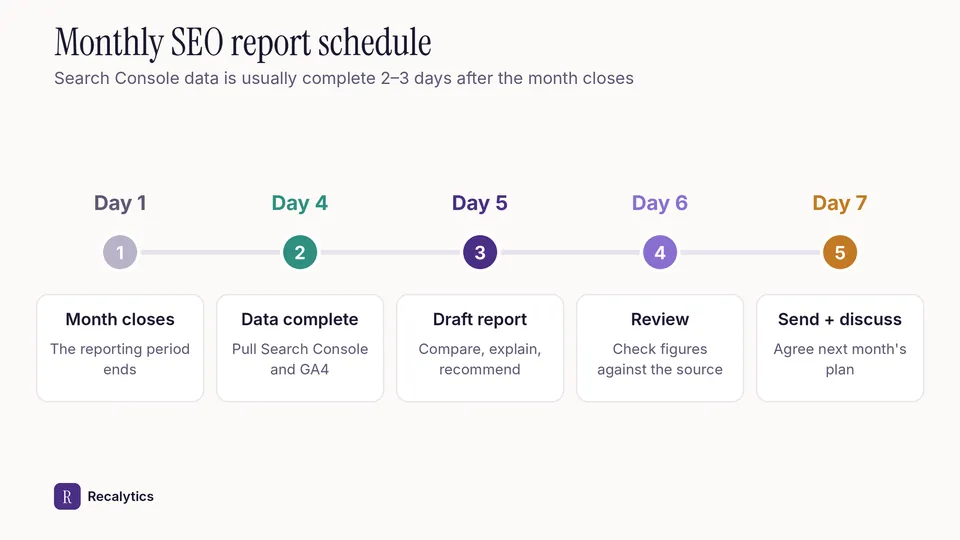
A monthly SEO report is best sent on day 5 to 7 of the following month. Search Console data is usually available 2–3 days after collection. Google Analytics receives Search Console data 48 hours after collection. End-of-month data is complete in both tools around day 3 or 4.
The image below shows the 5-step schedule from the month closing to the discussion with the client.
The schedule repeats every month as a 6-stage cycle. The diagram below shows the content of each stage.
Pull data · Day 4
Export Search Console and GA4 data for last month, the month before and the same month last year.
Compare · 3 periods
Calculate the change in clicks, impressions, CTR, position and conversions for all 3 periods.
Explain · Causes
Write one sentence on the cause of every change larger than 10%.
Recommend · 3–5 actions
Turn every cause into an action with a numeric target and an owner.
Send and discuss · Day 7
Send the report, then agree next month's plan with the client in a 30-minute meeting.
Do the work · All month
Carry out the plan and log every change to the site with its date for the next report.
Stage 6 prepares the material for stage 1 of the next month.
What should be checked before the report is sent?
A monthly SEO report is checked against 6 points before sending: figures, periods, sources, causes, actions and terms. The checklist below can be used as it is.
Preparing the 7 sections can be automated. Recalytics turns the Search Console and GA4 data of each client website into a monthly report with an AI narrative whose numbers are checked against the data, as slides, a PDF, a PPTX and a client portal.
Frequently asked questions
How long should a monthly SEO report be?
One section per 1 to 2 pages is enough, so a main report with 7 sections fits in 8 to 14 pages, plus a data appendix.
Does the report need last year's data?
Yes, for Search Console properties older than 12 months. The year-ago comparison separates seasonal effects from the results of SEO work.
Is a keyword ranking list required?
No. Search Console average position covers every query that showed the site, while a rank tracker only checks a fixed list of keywords.
Sources
The Recalytics Team writes guides on SEO and analytics reporting for digital agencies and website owners, based on Google's official documentation and Search Console and GA4 data.