Search Console Performance Report: 4 Metrics Explained
Short answer
The Search Console Performance report shows how often a site appears and gets clicked in Google Search through 4 metrics: total clicks, total impressions, average CTR and average position, with up to 16 months of data.
In this article
The Performance report is the Google Search Console report that records a site's clicks, impressions, CTR and position in Google Search results. The Performance report keeps up to 16 months of data, so a year-over-year comparison fits on one screen. This guide covers the official definition of the 4 metrics, how Google counts AI Overviews and AI Mode, and the 4 data rules that make the numbers look different from other tools.
What are the 4 metrics in the Performance report?
The Performance report has 4 metrics: total clicks, total impressions, average CTR and average position. The image below shows the 4 metrics with example figures for one site over 28 days.
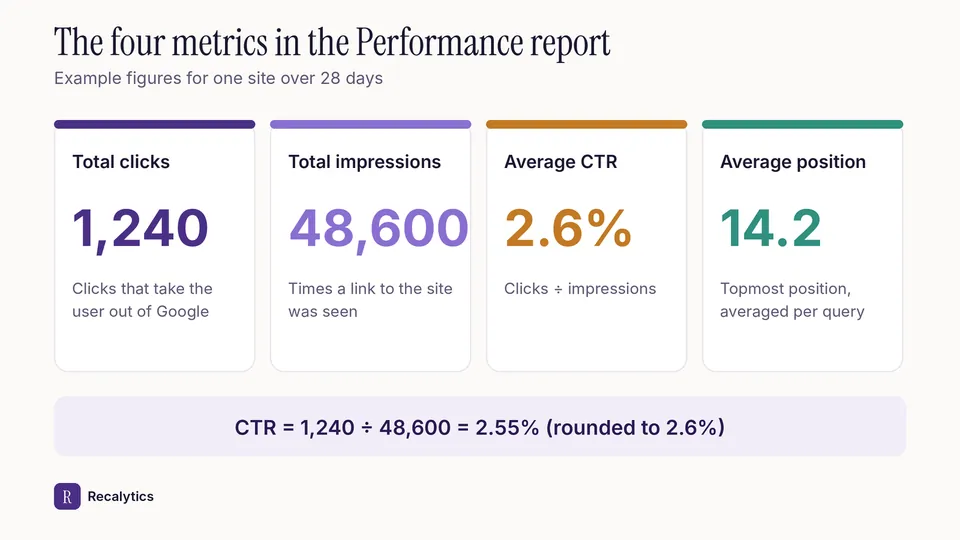
The figures in the image are linked to each other: the 2.6% CTR is 1,240 clicks divided by 48,600 impressions. The 4 metrics are always read together, because a change in one metric almost always moves another.
Clicks
A click counts when the user opens a page outside Google Search, Discover or Google News. Clicks that stay inside Google do not count. A user who comes back and clicks the same link again is recorded as 1 click. Clicks on different links count separately.
Impressions
An impression counts when a link to the site appears on the results page the user has open, even before the link is scrolled into view, as long as the user does not need to click to see the link. An item inside a carousel counts only after the item is scrolled into view. Scrolling away and back within one query adds no impressions.
CTR
CTR is total clicks divided by total impressions. A site with 1,240 clicks from 48,600 impressions has a CTR of 2.55%. CTR is always read together with position, because the same query produces a very different CTR at position 2 and at position 15.
Average position
Average position is the topmost position of the site's link in search results, averaged across every query that showed the site. Google takes only the highest position per query. Google's own example: the site appears at positions 2, 4 and 6 for the first query, which is recorded as position 2. The site also appears at positions 3, 5 and 9 for the second query, which is recorded as position 3. The average position of the 2 queries is 2.5.
A position is recorded only when the link received an impression. A dash in the position column means Search Console recorded no position for that row.
How is one query recorded in the Performance report?
One query is recorded in 5 stages: the query is typed, the link is shown, the position is recorded, the link is clicked, and the visit is recorded in Google Analytics. The diagram below shows the rule at each stage.
Query · Queries tab
Every query that showed the site is recorded in the Queries tab. Very rare queries are anonymized for privacy and are not listed in the table.
Impression · 48,600
A link to the site appears on the results page the user has open. A carousel item counts only after it is scrolled into view.
Position · 14.2
Search Console records the topmost position of the site's link for each query, then averages it. A smaller position number means the link is closer to the top of the page.
Click · 1,240
A click counts when the user opens a page outside Google. Clicking the same link again still counts as 1 click.
Visit · GA4 session
Google Analytics 4 records the click as an organic session. GA4 sessions and Search Console clicks come from 2 different systems, so the numbers never match exactly.
The example figures match the four-metric image above.
How are AI Overviews and AI Mode counted?
AI Overviews and AI Mode are counted with the same impression, click and position rules as regular search results. One AI Overview occupies 1 position, and every link inside the AI Overview shares that position. A click on an external link in an AI Overview or in AI Mode counts as a click. A follow-up question in AI Mode counts as a new query. Search Labs experiment data is excluded from the report.
Since June 2026, Search Console also offers a generative AI performance report for impressions from AI Overviews and AI Mode. The generative AI report contains impressions only, with no clicks. The generative AI report data is part of the Web search type in the Performance report.
A rise in impressions without a rise in clicks has 6 common causes, covered in the guide on impressions up, clicks down.
Why do Search Console numbers differ from other tools?
Search Console numbers differ from other tools because of 4 data rules: anonymized queries, the 1,000-row limit, Pacific Time and the 2–3 day delay. The 4 rules are described in the official Search Console documentation:
- Anonymized queries: very rare queries are hidden from the table for privacy, but still count in the chart totals unless a query filter is applied.
- 1,000-row limit: the table shows at most 1,000 rows, so some long-tail queries appear only in the chart totals.
- Pacific Time: daily data is recorded in Pacific Time (PT), so a day in the report does not match a calendar day in other time zones.
- Data delay: data is usually available 2–3 days after collection.
Search Console Help: support.google.com
Google Analytics 4 receives Search Console data 48 hours after Search Console collects the data. Google Analytics tracks only users with JavaScript enabled, so GA4 organic sessions are not the same as Search Console clicks.
How do you read the Performance report?
The Performance report is read in 5 steps: set the date range, turn on the 4 metrics, compare periods, break the data down by dimension, then note the findings. The order below works for a small site and for a site with thousands of pages:
- Set a 28-day or 3-month range, because a 7-day range is easily skewed by holidays.
- Turn on all 4 metric cards above the chart: total clicks, total impressions, average CTR and average position.
- Choose Compare to see the previous period or last year with the same number of days.
- Break the data down by Queries, Pages, Countries, Devices and Search appearance.
- Note the 3 biggest findings with their figures as material for the report.
The findings from step 5 become the core of a monthly SEO report for clients, which compares the current month with last month and last year.
Frequently asked questions
How long does the Performance report keep data?
The Performance report keeps up to 16 months of data. Older data has to be exported regularly, for example to Google Sheets or BigQuery.
Do clicks from AI Overviews count?
Yes. Clicks on external links in AI Overviews and AI Mode count as clicks in the Performance report.
Why does average position improve while clicks fall?
Average position improves when the site stops appearing for queries at low positions. Queries at low positions add impressions but rarely add clicks, so losing those queries improves the average without adding clicks.
Sources
- Search Console Help: What are impressions, position, and clicks?
- Search Console Help: Performance report, troubleshooting data discrepancies
- Search Console Help: Generative AI performance report (Search)
- Google Search Central Blog: Introducing Search generative AI performance reports (June 2026)
- Analytics Help: Google organic search traffic report
The Recalytics Team writes guides on SEO and analytics reporting for digital agencies and website owners, based on Google's official documentation and Search Console and GA4 data.