How to Explain a Drop in Organic Traffic to Clients
Short answer
Explain an organic traffic drop in 3 parts: the size of the drop, the cause the data supports, and the next step with a review date. Find the cause by comparing periods in the Search Console Performance report.
In this article
An organic traffic drop is a fall in visits from Google's unpaid results, seen as fewer Search Console clicks or GA4 Organic Search sessions. The drop is always measured against a comparable period, such as last month and the same month last year.
Clients usually ask about an organic traffic drop when the monthly report shows a lower number than last month. This guide covers how to find the cause and how to explain it to the client with data.
What causes a drop in organic traffic?
Google lists 6 main causes of a Search traffic drop: algorithm updates, technical issues, security issues, spam, seasonality, and site moves. The table below sums up the sign and the check for each cause.
| Cause | Sign in the Performance report | How to check |
|---|---|---|
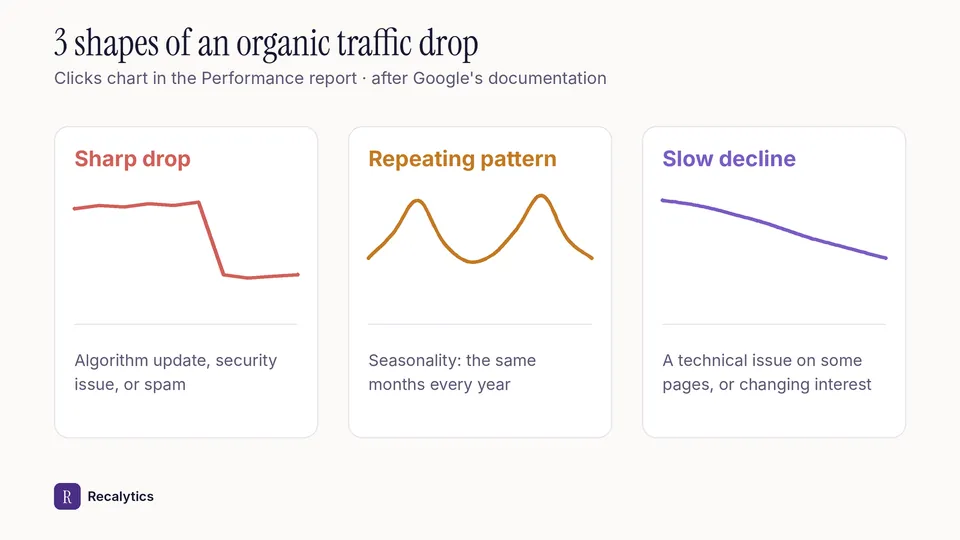
| Algorithm update, such as a core update | A sharp drop around the update date | Match the date with the Google Search Status Dashboard |
| Technical issue | A sharp drop when the whole site is affected, a slow one when only some pages are | Page indexing report and URL Inspection |
| Security issue | A sharp drop | Security issues report |
| Spam issue | A sharp drop | Manual actions report |
| Seasonality and changing interests | A pattern that repeats in the same months every year | A 16-month range and Google Trends |
| Site move | Ups and downs while Google recrawls | A few weeks for a medium-sized site |
Google also mentions reporting glitches and changes in how data is processed. Check the Search Console data anomalies page before settling on another cause.
How to check the impact of an algorithm update is covered in the guide on a Google core update.
How do you find the cause of an organic traffic drop?
To find the cause of an organic traffic drop, compare periods in Search Console, then check the pages that lost the most clicks. The steps from Google's documentation:
- Choose the last 16 months to see yearly patterns.
- Compare the last 3 months with the previous period and with last year, then open the queries, pages, countries, devices, and search appearance tabs.
- Filter the search type: Web, Image, Video, or News.
- Sort pages by the difference in clicks to find the pages that fell the most.
- Check impressions and clicks together to tell lower visibility apart from changed user choices.
- Check the main queries in Google Trends to tell a site drop apart from an industry-wide drop in interest.
Steady impressions with falling clicks follow a pattern of their own. The guide on why impressions go up while clicks go down covers that pattern.
The figure below compares the 3 chart shapes of a drop that Google describes.
How do you explain an organic traffic drop to a client?
Explain an organic traffic drop to a client in 3 parts: the size of the drop, the cause the data supports, and the next step. The size is written in full, with the previous month's number and the percentage.
Avoid the word because when the data only shows that two things happened at the same time. Use coincides with, then name the data that still needs checking.
How long does organic traffic take to recover?
Organic traffic recovery has no fixed timeline. Google says some changes take effect in a few days. Other changes take several months.
Google advises waiting a few weeks before analyzing again in Search Console. Google also doesn't guarantee that changes to a site will have a noticeable impact.
The next monthly report shows the latest numbers, the comparison with the month of the drop, and the status of each fix. The report layout is covered in the guide on the monthly SEO report for clients.
Recalytics pulls Search Console and GA4 data for each client website every month and turns it into a report.
Frequently asked questions
Does an organic traffic drop always mean lower rankings?
No. Clicks also fall when seasonal interest drops or the search results page changes, even with a steady position.
When should an organic traffic drop be reported right away?
Report it right away when Search Console sends a security issue or manual action notice. Other drops are covered in the monthly report.
Do GA4 Organic Search sessions and Search Console clicks fall by the same percentage?
Not necessarily. The two tools measure differently, so compare the direction of the change, not the numbers.
Sources
The Recalytics Team writes guides on SEO and analytics reporting for digital agencies and website owners, based on Google's official documentation and Search Console and GA4 data.