How to Link Search Console to GA4
Short answer
To link Search Console to GA4, open Admin in GA4, choose Search Console Links under Product links, then pick the Search Console property and the site's web data stream.
In this article
To link Search Console to GA4, open GA4 Admin, choose Search Console Links, then pick the Search Console property and the web data stream. The link brings Search Console query and organic landing page data into GA4.
The link helps when a client report needs Google queries and visitor behavior in one place. This guide covers the requirements, the steps, where the reports are, and the limits of the data.
What do you need to link Search Console to GA4?
Linking Search Console to GA4 needs the Editor role on the GA4 property and verified ownership of the Search Console property. Ownership can also be verified during the linking process.
The limits of the link:
- A web data stream can link to only 1 Search Console property.
- A Search Console property can link to only 1 web data stream.
- A GA4 property can have only 1 data stream linked to Search Console.
What are the steps to link Search Console to GA4?
The steps to link Search Console to GA4 start in Admin, under Product links, at Search Console Links. The full order:
Open Admin · Product links
In GA4 Admin, open Product links, then click Search Console Links.
Click Link · Link table
Click Link in the Search Console link table.
Pick the property · Properties you manage
Choose the Search Console property in the row of properties you manage, then click Confirm and Next.
Pick the stream · Web data stream
Choose the site's web data stream, then click Next.
Submit · Review and submit
Review the settings and submit the link.
A link can't be edited. Delete the old link and create a new one to change it.
Where are the Search Console reports in GA4?
The Search Console reports in GA4 sit in the Search Console collection, which has to be published from Library first. The collection is unpublished by default.
The Search Console collection holds 2 reports:
- The Google Organic Search Queries report shows queries, clicks, impressions, CTR, and average position.
- The Google Organic Search Traffic report shows landing pages with Search Console and GA4 metrics.
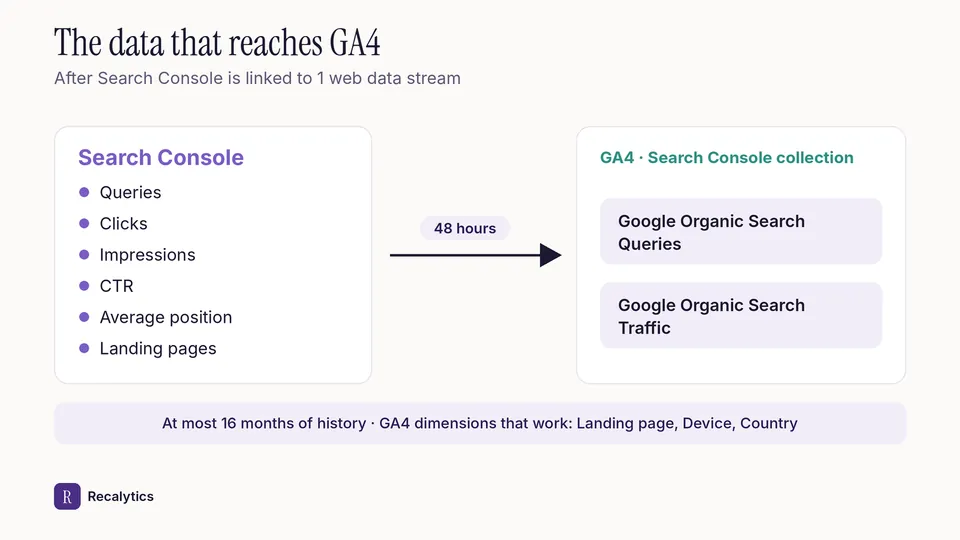
The figure below shows the data that moves from Search Console into GA4 after linking.
Other GA4 reports that help SEO are covered in the guide on how to read Google Analytics 4.
What are the limits of Search Console data in GA4?
Search Console data appears in GA4 48 hours after Search Console collects it, with a history of at most 16 months. The Search Console reports in GA4 also don't support time-series charts.
Search Console metrics work only with Search Console dimensions and 3 GA4 dimensions: Landing page, Device, and Country. The Queries report can't be broken down by GA4 dimensions.
Data starts on the verification date when the data stream was created before verification. Data starts on the stream's creation date when verification came first.
Clicks in Search Console and sessions in GA4 still won't match exactly after linking. The reason is covered in the guide on how to read the Search Console Performance report.
Recalytics reads Search Console and GA4 directly through the client's Google account and turns both into a monthly report.
Frequently asked questions
Does older Search Console data come into GA4?
Partly. Data starts on the verification date or the stream's creation date, and the history is at most 16 months.
Why don't the Search Console reports show in GA4?
The Search Console collection is unpublished by default. Publish it from Library.
Can one Search Console property link to 2 GA4 properties?
No. A Search Console property can link to only 1 web data stream.
Sources
The Recalytics Team writes guides on SEO and analytics reporting for digital agencies and website owners, based on Google's official documentation and Search Console and GA4 data.