How to Read Google Analytics 4 for SEO Reporting
Short answer
Google Analytics 4 (GA4) records what visitors do after they arrive on a site. For SEO, the 5 most useful reports are Traffic acquisition, Landing page, Pages and screens, Key events and Google organic search traffic.
In this article
- How is Google Analytics 4 different from Search Console?
- Which 5 GA4 reports matter for SEO?
- 1. Traffic acquisition
- 2. Landing page
- 3. Pages and screens
- 4. Key events
- 5. Google organic search traffic
- What does engagement rate mean in GA4?
- How long does GA4 keep data?
- How do you use GA4 in a monthly SEO report?
- Frequently asked questions
Google Analytics 4 (GA4) is the version of Google Analytics that records the behavior of site and app visitors as events. GA4 replaced Universal Analytics, which stopped processing data on July 1, 2023.
A total visitor count isn't enough for an SEO report. The right GA4 reports show which pages bring visitors from Google and what those visitors do next. This guide on how to read Google Analytics 4 covers the 5 reports, what engagement rate means and the limits of GA4 data.
How is Google Analytics 4 different from Search Console?
Google Analytics 4 records what happens after a visitor arrives on the site. Search Console records what happens before that, in Google's search results: impressions, clicks and position.
Search Console clicks and GA4 sessions never match exactly because the two tools measure differently. The full explanation is in how to read the Search Console Performance report.
Which 5 GA4 reports matter for SEO?
The 5 most useful GA4 reports for SEO are Traffic acquisition, Landing page, Pages and screens, Key events and Google organic search traffic. The first 4 are in the Reports menu. The fifth has to be published from the Library first.
1. Traffic acquisition
The Traffic acquisition report shows where new and returning visitors come from. Its default dimension is the session default channel group. Type google / organic into the search box above the table to see organic Google traffic only.
2. Landing page
The Landing page report shows the first page visitors open in each session. Use the Landing page report to see which pages bring the most sessions from Google.
3. Pages and screens
The Pages and screens report counts views and engagement time for every page. The numbers in Pages and screens cover all visitors, wherever they came from.
4. Key events
Key events are events that measure actions that matter to the success of a business, such as a form submission or a purchase. Google renamed conversions in GA4 to key events. Without key events, an SEO report can only report visits, not business results.
How to mark and read key events is covered in the guide on GA4 key events.
5. Google organic search traffic
The Google organic search traffic report combines Search Console and GA4 data by landing page. The report needs an active link between Search Console and GA4. By default, the report sits in the unpublished Search Console collection.
The diagram below shows the path from search results to a key event, and the report that records each stage.
Impressions and clicks · Search Console
The Search Console Performance report records impressions, clicks, CTR and position in Google results.
Organic session · Traffic acquisition
GA4 records a visit from Google as a session in the Organic Search channel.
First page · Landing page
The Landing page report shows the page where the organic session started.
Engaged session · Engagement rate
A session counts as engaged when it lasts longer than 10 seconds, has a key event or has 2 or more page views.
Business result · Key events
Key events from the organic channel become the conversions section of the SEO report.
Stage 1 is in Search Console; stages 2 to 5 are in GA4.
What does engagement rate mean in GA4?
Engagement rate in GA4 is the share of sessions that were engaged. GA4 counts a session as engaged when the session meets any one of 3 conditions:
- The session lasts longer than 10 seconds.
- The session has a key event.
- The session has 2 or more page or screen views.
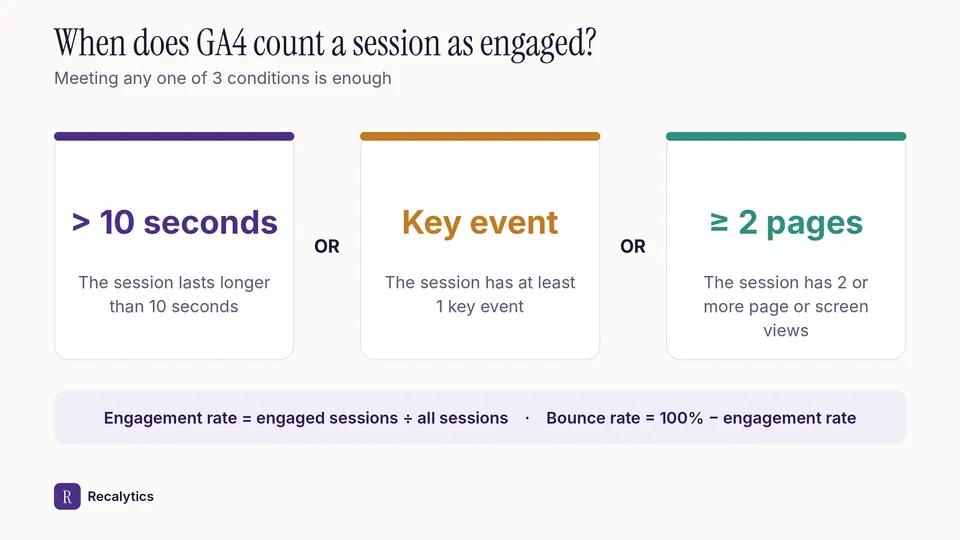
Bounce rate in GA4 is the opposite: the share of sessions that weren't engaged. Take one session under 10 seconds with no events and no second page. The session's engagement rate is 0% and its bounce rate is 100%.
Google Analytics Help: support.google.com
The formula and a worked example of engagement rate are in the guide on engagement rate in GA4.
How long does GA4 keep data?
A standard GA4 property keeps user-level and event-level data for 2 months or 14 months, depending on the setting. The retention setting only affects Explorations and funnel reports. Standard aggregated reports are not affected.
Switch retention to 14 months from the start. With 14 months, Explorations can compare a month with the same month last year.
How do you use GA4 in a monthly SEO report?
GA4 covers the organic conversions section of a monthly SEO report. Take organic sessions from Traffic acquisition, the pages that bring sessions from Landing page, and the number of key events from the organic channel.
The full report structure is in the monthly SEO report for clients. Recalytics pulls GA4 and Search Console data every month for that report.
Frequently asked questions
Can you still open Universal Analytics data?
No. Access to Universal Analytics properties ended the week of July 1, 2024, and the data was deleted.
Why do GA4 organic sessions differ from Search Console clicks?
Search Console counts clicks from Google results. GA4 only records visitors whose browsers run JavaScript, and it groups visits into sessions.
Does the retention setting affect standard GA4 reports?
No. The retention setting only affects Explorations and funnel reports.
Sources
- Analytics Help: Google Analytics 4 has replaced Universal Analytics
- Analytics Help: [GA4] Engagement rate and bounce rate
- Analytics Help: [GA4] Traffic acquisition report
- Analytics Help: [GA4] Landing page report
- Analytics Help: Conversions vs. key events in Google Analytics
- Analytics Help: Google organic search traffic report
- Analytics Help: [GA4] Data retention
The Recalytics Team writes guides on SEO and analytics reporting for digital agencies and website owners, based on Google's official documentation and Search Console and GA4 data.