How to Use GA4 Key Events to Measure SEO Results
Short answer
GA4 key events are events marked as actions that matter to the business, such as form submissions or purchases. Mark the event in Admin, then read its count in the Organic Search row of the Traffic acquisition report.
In this article
GA4 key events are Google Analytics 4 events marked as actions that matter to a business, such as form submissions, sign-ups, or purchases. Google renamed conversions in Analytics to key events.
An SEO report with only clicks and sessions doesn't answer the client's question about business results. This guide covers how to mark key events, their limits, and how to read them for organic traffic.
What is the difference between key events and conversions in GA4?
Key events are important events that are recorded and shown in Google Analytics reports. Conversions are built from events or key events and shared with Google Ads to measure ad campaigns.
Google split the two terms to make conversions mean the same thing in Google Ads and Google Analytics. Google Ads conversions don't appear in standard GA4 reports. Key events do.
How to choose the key events that become KPIs is covered in the guide on SEO KPIs for client reports.
How do you mark a key event in GA4?
The way to mark a key event in GA4 is to open Admin, Data display, Events, and click the star next to the event. The step needs the Editor role or above on the property.
An event that doesn't exist yet is created from the same page:
- Open Admin, then Data display, then Events.
- Click Create event. The button only appears for the Marketer role or above.
- Enter an event name without special characters, then turn on Mark as key event.
- Choose a default value and a counting method, then click Create.
The purchase event is always marked as a key event automatically. Other events, such as generate_lead or form_submit, have to be marked.
How many key events can a GA4 property have?
A GA4 property can have up to 30 key events in a standard property and up to 50 in an Analytics 360 property. The purchase event counts toward that limit.
Standard reports can take up to 24 hours to show a newly marked key event. Realtime reports show it a few minutes after the event happens.
How do you read key events from organic traffic?
Key events from organic traffic are read in the Traffic acquisition report, in the Organic Search row, under the Key events column. Pick one key event in that column's menu to see its count alone, for example generate_lead.
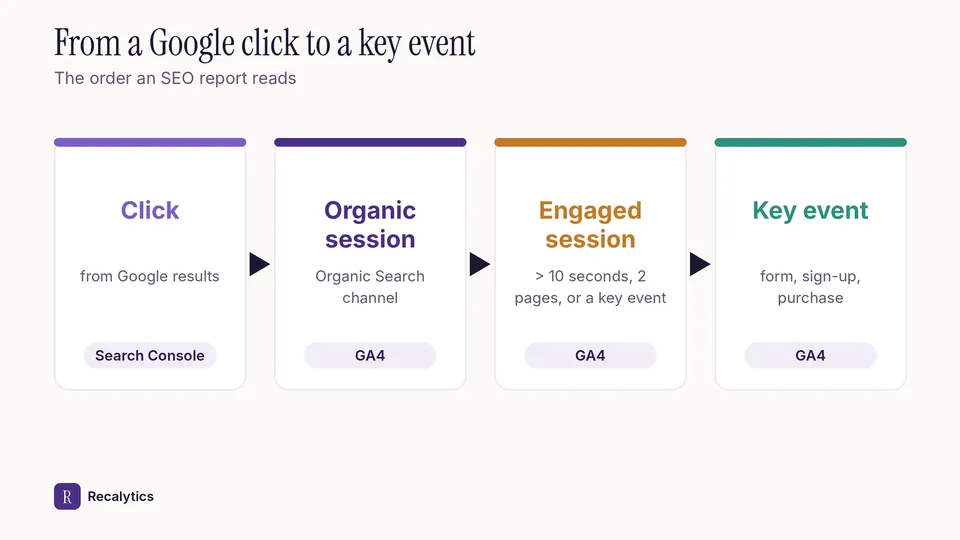
The Session key event rate column shows the percentage of sessions with at least 1 key event. The figure below shows the path from a click on Google to a key event on the site.
Compare organic key events with last month and last year. A drop is reported with its numbers, for example from 40 to 32 forms, or 20% lower.
The report layout that holds these numbers is covered in the guide on the monthly SEO report for clients. Recalytics pulls Search Console and GA4 data for each client website every month and turns it into a report.
Frequently asked questions
Are key events the same as goals in Universal Analytics?
They serve a similar purpose: recording important actions. Goals were a Universal Analytics feature, and Universal Analytics stopped processing data on 1 July 2023.
Why doesn't a new key event show in reports yet?
Standard reports can take up to 24 hours to show a newly marked key event.
Can key events be used in Google Ads?
Yes. A Google Ads conversion can be created from a GA4 key event, and it then appears in the Advertising section of GA4.
Sources
The Recalytics Team writes guides on SEO and analytics reporting for digital agencies and website owners, based on Google's official documentation and Search Console and GA4 data.