What Is Engagement Rate in GA4 and How Do You Read It?
Short answer
Engagement rate in GA4 is the percentage of sessions that were engaged. A session is engaged when it lasts longer than 10 seconds, has a key event, or has at least 2 page or screen views.
In this article
Engagement rate in GA4 is the percentage of all sessions on a website or app that were engaged sessions. A session counts as engaged when it lasts longer than 10 seconds, has a key event, or has at least 2 page or screen views.
Engagement rate shows up in a client's GA4 reports. The client needs to know what it means before judging a rise or a fall. This guide explains how GA4 calculates engagement rate, how it differs from bounce rate, and how to read it in an SEO report.
How does GA4 calculate engagement rate?
GA4 calculates engagement rate by dividing the number of engaged sessions by the number of all sessions and showing the result as a percentage. An engaged session meets at least 1 of these 3 conditions:
- The session lasts longer than 10 seconds.
- The session has at least 1 key event.
- The session has 2 or more page or screen views.
The first_visit, first_open, and session_start events don't count toward the key event condition, even when they are marked as key events. A session ends after 30 minutes of inactivity.
The figure below shows a worked example with round numbers.
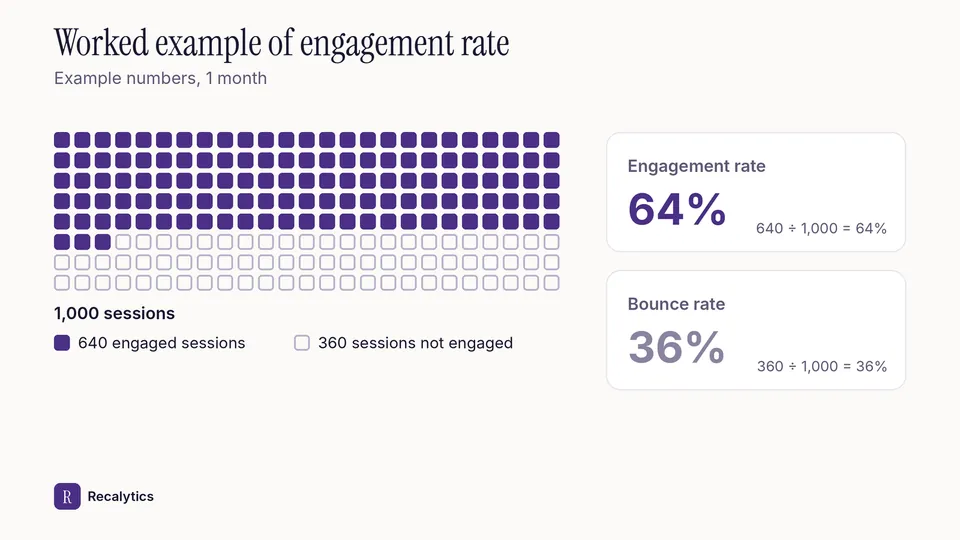
In the example, 640 of 1,000 sessions meet at least 1 condition. Engagement rate is 64%, and the remaining 360 sessions make up a bounce rate of 36%.
How to mark key events is covered in the guide on GA4 key events.
What is the difference between engagement rate and bounce rate in GA4?
Bounce rate in GA4 is the inverse of engagement rate: the percentage of sessions that were not engaged. Engagement rate and bounce rate always add up to 100%.
Universal Analytics calculated bounce rate differently, as single-page sessions divided by all sessions. GA4 bounce rate and Universal Analytics bounce rate can't be compared directly.
| Metric | How it is calculated | Version |
|---|---|---|
| Engagement rate | Engaged sessions ÷ all sessions | GA4 |
| Bounce rate | Sessions not engaged ÷ all sessions | GA4 |
| Bounce rate | Single-page sessions ÷ all sessions | Universal Analytics |
Where do you find engagement rate in GA4?
Engagement rate is part of the Traffic acquisition report and can be added to other detail reports, such as Pages and screens. The Traffic acquisition report shows engagement rate per channel, including Organic Search.
Steps to add engagement rate to the Pages and screens report:
- Open Reports, then open the Pages and screens report.
- Click Customize report in the top right. The option needs the Editor or Administrator role.
- Under Report data, click Metrics, then Add metric.
- Search for Engagement rate, click Apply, and save the report.
The new metric appears as the last column of the table. Overview reports don't support adding metrics.
Other GA4 reports that help SEO are covered in the guide on how to read Google Analytics 4.
What is a good engagement rate?
A good engagement rate is one that holds steady or rises compared with an earlier period on the same site. Google doesn't set a benchmark for engagement rate.
Compare engagement rate by channel and by landing page. The sitewide total mixes traffic from every channel. A page that answers a short question can have a low engagement rate even when visitors got their answer.
Engagement rate for organic traffic fits the engagement section of the monthly SEO report for clients. Recalytics pulls Search Console and GA4 data for each client website every month and turns it into a report.
Frequently asked questions
Is GA4 engagement rate the same as social media engagement rate?
No. Social media engagement rate is usually based on likes, comments, and shares. GA4 engagement rate is based on sessions on a website or app.
Does GA4 still have bounce rate?
Yes. Bounce rate in GA4 is the percentage of sessions that were not engaged, and it is defined differently from bounce rate in Universal Analytics.
Why did engagement rate go up after adding a key event?
A session with a key event counts as engaged. A new key event means more sessions meet that condition.
Sources
The Recalytics Team writes guides on SEO and analytics reporting for digital agencies and website owners, based on Google's official documentation and Search Console and GA4 data.