Why Pages Aren't Indexed by Google and How to Fix Them
Short answer
A page isn't indexed because Google hasn't found it, hasn't crawled it, or decided not to store it. Search Console's Page indexing report lists the reason for each group of pages, with example URLs.
In this article
Pages not indexed are pages Google knows about but has not stored in its index, so they cannot appear in search results. The list of pages not indexed, with the reason for each, is in the Page indexing report in Google Search Console.
The problem usually shows up when a new article never appears on Google. Another sign is a rising count of pages not indexed in Search Console. This guide covers how to read the report, what each reason means, and how to fix it.
Where do you see the pages that aren't indexed?
The pages that aren't indexed are listed in the Page indexing report, under Indexing, then Pages. The report summary shows a chart of indexed and not indexed pages, plus a table of the reasons pages aren't indexed.
The sitemap filter above the chart limits the data to all known pages, pages submitted in a sitemap, or pages outside the sitemap. Choose submitted pages to see the pages you actually want indexed.
The example URLs for each reason are capped at 1,000 rows. The status of one specific page is checked with the URL Inspection tool.
How to set up Search Console and give the team access is covered in the guide on Google Search Console.
What does each reason for a page not being indexed mean?
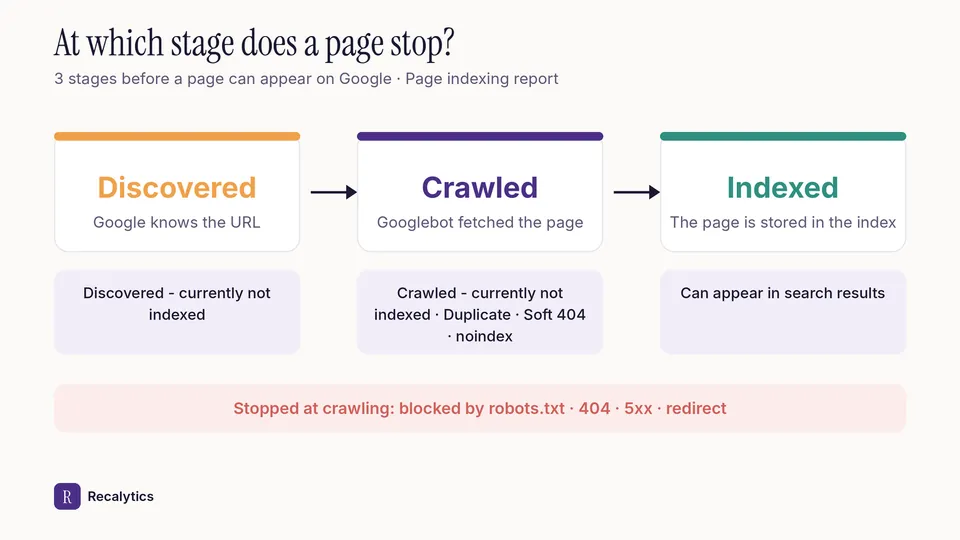
Each reason in the Page indexing report points to the stage a page hasn't passed: discovery, crawling, or indexing. The table below sums up the 11 reasons in Google's documentation.
| Reason | What it means | What to do |
|---|---|---|
| Crawled - currently not indexed | Google crawled the page but hasn't indexed it | Check that the content is unique and complete |
| Discovered - currently not indexed | Google found the URL but hasn't crawled it yet | Check server response time and internal links to the page |
| Duplicate without user-selected canonical | The page duplicates another and names no canonical | Nothing, if the page really is a duplicate |
| Duplicate, Google chose different canonical than user | Google picked another URL as the canonical | Compare both URLs in URL Inspection |
| Alternate page with proper canonical tag | Another version of a page that is already indexed | Nothing |
| Excluded by 'noindex' tag | The page carries a noindex tag | Remove the tag if the page should be indexed |
| Blocked by robots.txt | robots.txt stops Google from crawling the page | Edit robots.txt if the page should be indexed |
| Not found (404) | The page returns a 404 code | Add a 301 redirect if the page moved |
| Soft 404 | The page shows a not-found message with a success code | Return a real 404 or add real content |
| Page with redirect | The URL redirects to another address | Nothing, if the redirect is intended |
| Server error (5xx) | The server returned a 500-level error when crawled | Check the Crawl Stats report and test the live URL |
The figure below shows the stage where each group of reasons appears, from finding the URL to the page entering the index.
Why is a page crawled but not indexed?
A page marked Crawled - currently not indexed has been fetched by Googlebot, but Google decided not to store it in the index yet. Google's documentation says the page may be indexed later and doesn't need to be resubmitted.
Google doesn't give an exact reason for each page. The same documentation says duplicates and pages without meaningful content aren't expected to be indexed.
Steps to check a page with the Crawled status:
- Open the page in URL Inspection and make sure Google can render its content.
- Compare the page with other pages on the site that cover the same topic.
- Add internal links from pages that are already indexed.
- Merge thin pages into a more complete page, then add a 301 redirect.
Why is a page discovered but not crawled?
A page marked Discovered - currently not indexed is known to Google by its URL, but hasn't been crawled yet. According to Google, the most common cause is a delayed crawl that keeps the site's server from being overloaded.
The Crawl Stats report under Settings shows server response time and the number of Googlebot requests per day. A new site can take about a week before its pages are found and crawled.
How do you fix pages that aren't indexed?
The way to fix pages that aren't indexed is to resolve each reason's cause, then ask Google to validate the fix. The steps, in order:
Pick a reason · Reasons table
Open one reason in the table and look at the example URLs.
Check one URL · URL Inspection
See the Google-selected canonical, the last crawl date, and the live test result.
Fix it · Content, tags, or server
Remove the noindex tag, fix the redirect, or complete the page content, depending on the reason.
Validate · Validate fix
Click Validate fix once every URL with the same reason has been fixed.
Wait · About 2 weeks
Google says validation typically takes about two weeks, but it can take longer.
Validation stops if Google still finds 1 URL with the same issue.
A validation moves from Not started, Started, and Looking good to Passed or Failed. A resolved issue stays in the report for 90 days after its last instance disappears.
Which pages must be indexed?
The pages that must be indexed are the ones meant to appear on Google, such as the homepage, service or product pages, and articles. Google says not to expect every URL on a site to be indexed.
A client report only needs the number of sitemap pages that aren't indexed, with their reasons. The report structure is covered in the guide on the monthly SEO report for clients.
Recalytics pulls Search Console and GA4 data for each client website every month and turns it into a report.
Frequently asked questions
How long does Google take to index a new page?
Google says new content can take a few days to be indexed. Crawling can take anywhere from a few days to a few weeks.
Does Request indexing guarantee a page gets indexed?
No. Google says requesting a crawl doesn't guarantee inclusion in search results instantly, or at all.
Does robots.txt keep a page out of the index?
Not reliably. Google can still index a URL blocked by robots.txt when other information points to it.
Sources
The Recalytics Team writes guides on SEO and analytics reporting for digital agencies and website owners, based on Google's official documentation and Search Console and GA4 data.