What Is Google Search Console and How Do You Use It?
Short answer
Google Search Console is a free Google service for monitoring and fixing how a site appears in Google Search. Search Console shows queries, clicks, page indexing status and security issues.
In this article
Google Search Console is a free service from Google for monitoring, maintaining and troubleshooting a site's presence in Google Search results. The only requirement is a Google account.
Site owners, agencies and SEO teams open Search Console to see which queries bring visitors and which pages Google hasn't indexed yet. This guide explains what Google Search Console is, its main reports, how to set it up and how to give an agency access.
What is Google Search Console used for?
Google Search Console makes sure Google can find a site's pages, tracks how the site performs in search results and flags problems. Google's documentation lists 5 main uses:
- Confirming that Google can find and crawl the site's pages.
- Fixing indexing problems and asking Google to re-index new or updated pages.
- Viewing Google Search performance: how often the site appears, which queries bring visitors and the CTR.
- Receiving alerts about indexing, spam or other problems.
- Seeing which other sites link to yours.
The index status of each page, including why a page is not indexed yet, is covered in the guide on why pages aren't indexed by Google.
What are the main reports in Google Search Console?
Google splits Search Console reports into critical reports and optional reports. Critical reports need a regular check. Optional reports come into play when a specific problem appears.
| Report | Content | Type |
|---|---|---|
| Property overview | Critical issues such as security problems and manual actions, plus performance and indexing charts | Critical |
| Performance | Clicks, impressions, CTR and position for Web search, Google News and Discover | Critical |
| Security issues | Signs that the site has been hacked | Critical |
| Manual actions | Violations of Google's spam policies | Critical |
| Page indexing | Pages Google has and hasn't indexed | Optional |
| Experience | User experience, such as page loading time | Optional |
| URL Inspection | How Google sees one specific page | Optional |
The Performance report is the one most often used in client reports. Its 4 metrics are covered in how to read the Search Console Performance report.
How do you set up Google Search Console?
You set up Google Search Console by adding a property and then verifying that you own the site. Search Console has 3 property types, and each type has its own verification method.
| Property type | Coverage | Verification |
|---|---|---|
| Domain | All subdomains (www, m and others) and all protocols (http, https) | DNS record only |
| URL prefix | Only URLs with exactly the same prefix, including the protocol | Many options, such as an HTML file or a meta tag |
| Platform | Your site's accounts on YouTube, Instagram, TikTok and X | Through an existing site property or a platform login |
The image below compares what a Domain property and a URL-prefix property cover for the same site.
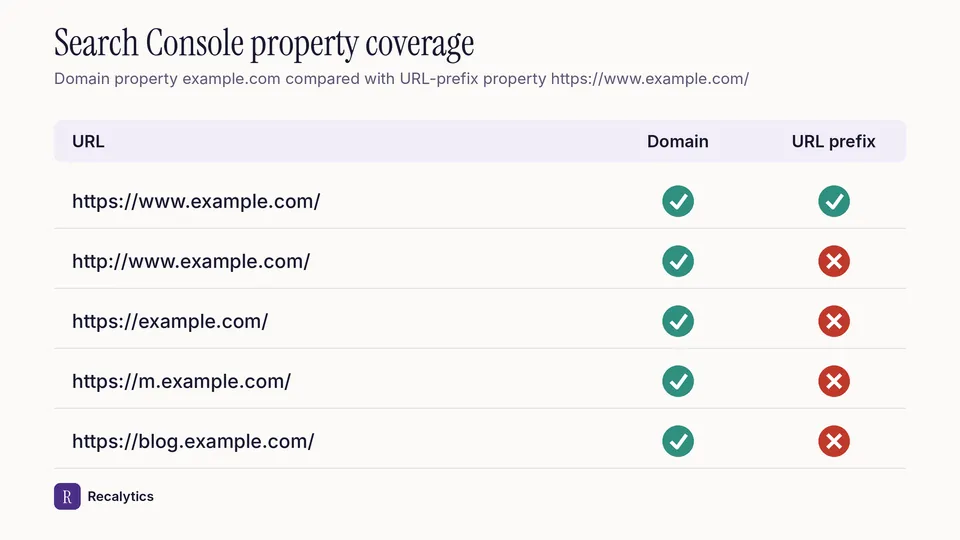
A URL-prefix property with https doesn't cover http URLs. One Google account can hold up to 1,000 properties.
Get a Google account · Free
A Google account is the only requirement for using Search Console.
Add a property · Domain or URL prefix
Choose Domain to cover every subdomain and protocol. Choose URL prefix to track one part of the site only.
Verify · DNS or HTML tag
A Domain property can only be verified with a DNS record at the domain provider. A URL-prefix property can use an HTML file or a meta tag.
Submit a sitemap · Sitemaps report
Submit the sitemap address in the Sitemaps report to help Google find the site's pages.
Wait for data · 2–3 days
Performance data is usually available 2–3 days after collection.
Step 4 is optional, but it helps sites with many pages.
How do you give an agency or client access to Search Console?
A property owner grants Search Console access under Settings, then Users and permissions. Only property owners can open that page. Search Console has 4 permission levels:
| Permission level | What it allows |
|---|---|
| Owner | All data and tools, including adding and removing users |
| Full user | All data and some actions, such as submitting sitemaps |
| Restricted user | Most data, and URL Inspection in read-only mode |
| Associate | No access to Search Console itself, but can take certain actions for the site |
A property can have up to 100 users besides its owners. Restricted user access is enough to read the Performance and Page indexing reports.
How often should you check Google Search Console?
Most users only need to check Search Console once a month, unless Google sends an alert about a problem. Google's own getting-started guide for Search Console gives that recommendation.
The monthly check doubles as material for a monthly SEO report for clients. Recalytics pulls the Search Console and GA4 data of each client website every month and turns it into that report.
Frequently asked questions
Is Google Search Console free?
Yes. Google describes Search Console as a free service, and the only requirement is a Google account.
What is the difference between Google Search Console and Google Analytics?
Search Console records what happens in Google Search results: impressions, clicks and position. Google Analytics records what visitors do after they arrive on the site.
Do you need to know how to code to use Search Console?
No. Google says users don't need to understand HTML or coding, but they do need to understand how their site is organized.
Sources
- Search Console Help: About Search Console
- Search Console Help: Getting started with Search Console
- Search Console Help: Add a website or platform property to Search Console
- Search Console Help: Managing owners, users, and permissions
- Search Console Help: Performance report, troubleshooting data discrepancies
The Recalytics Team writes guides on SEO and analytics reporting for digital agencies and website owners, based on Google's official documentation and Search Console and GA4 data.