Why Search Console Clicks and GA4 Sessions Don't Match
Short answer
Search Console clicks and GA4 sessions don't match because two different systems measure them. Search Console counts clicks in Google results. GA4 only records visits from browsers that run JavaScript and the Google tag.
In this article
- What is the difference between a Search Console click and a GA4 session?
- What makes clicks and sessions differ?
- 1. GA4 needs JavaScript
- 2. Visitors decline analytics cookies
- 3. Different time zones
- 4. Data delay
- 5. GA4's Organic Search channel is wider
- 6. Canonical URLs
- How do you compare clicks and sessions properly?
- Frequently asked questions
Search Console clicks and GA4 sessions don't match because two different systems measure them. Search Console counts clicks in Google results. GA4 counts visits recorded on your site. There is almost always a gap between the two, even when tracking is set up correctly.
Clients often ask why the report shows 1,200 clicks from Google while GA4 records only 950 organic sessions. This guide covers why Search Console clicks and GA4 sessions don't match, and how to compare them properly.
What is the difference between a Search Console click and a GA4 session?
Google records a Search Console click when a user clicks a link to your site in search results. Your site records a GA4 session when the page loads and the Google tag runs in the visitor's browser.
A GA4 session ends after 30 minutes of inactivity, and that limit can be raised to 7 hours 55 minutes. A user who clicks the same link twice from search results still counts as 1 click in Search Console.
Search Console click data can appear in GA4 once the two are linked. The steps are in how to link Search Console to GA4.
What makes clicks and sessions differ?
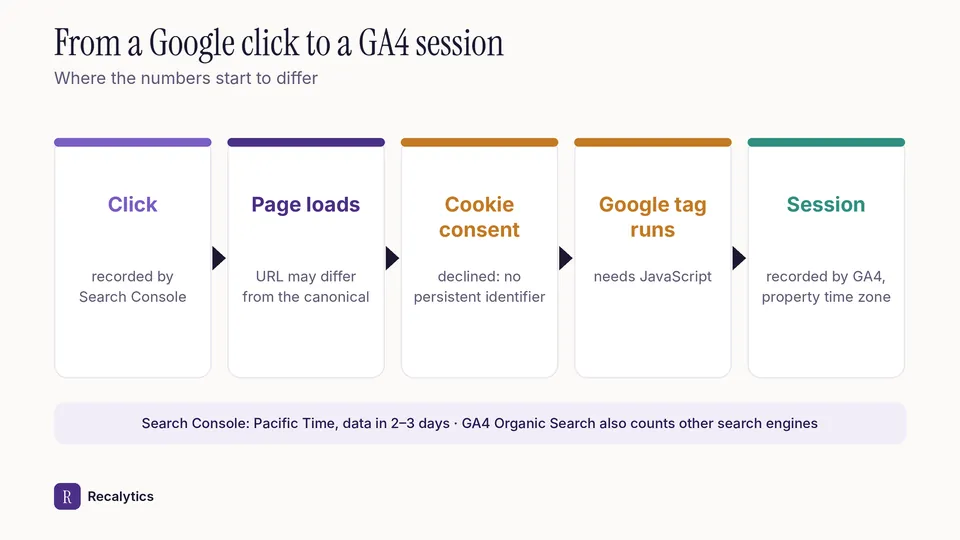
There are 6 main causes: JavaScript, cookie consent, time zones, data delay, the scope of the organic channel and canonical URLs. Each cause can make the GA4 number smaller or larger.
1. GA4 needs JavaScript
Search Console's documentation says Google Analytics only tracks users whose browsers run JavaScript. Clicks from users who block scripts still show in Search Console, but they never become GA4 sessions.
2. Visitors decline analytics cookies
Events from visitors who decline analytics cookies are not tied to a persistent user identifier. GA4 can estimate their behaviour through modelling, as long as the property qualifies.
The property needs at least 1,000 events a day from visitors who decline, for 7 days. The property also needs at least 1,000 daily users who accept, on 7 of the last 28 days. Small sites usually don't meet those thresholds.
3. Different time zones
Search Console's daily data uses Pacific Time. GA4 uses the time zone set in the property. Clicks close to midnight can land on different dates in the two tools.
4. Data delay
Search Console data is usually available 2–3 days after it is collected. Search Console data reaches GA4 48 hours after collection. A report pulled early in the month can use incomplete data.
5. GA4's Organic Search channel is wider
GA4's Organic Search channel counts sources on Google Analytics' list of search sites, or the medium organic. Search Console only counts clicks from Google. Visits from other search engines can make GA4's organic sessions larger than Search Console clicks.
6. Canonical URLs
Search Console records a click against the canonical URL, not the duplicate URL the user opened. GA4 records the page that was actually opened. Page-level numbers can differ between the tools even when the totals are close.
How do you compare clicks and sessions properly?
Compare clicks and sessions in GA4's Google Organic Search Traffic report, once Search Console is linked. That report shows landing pages with Search Console metrics and Analytics metrics side by side.
- Link Search Console to the web data stream in GA4.
- Open the Search Console collection in Library, then the Google Organic Search Traffic report.
- Pick the same range, at least 28 days, and leave out the last 3 days.
- Compare clicks and sessions per landing page, then look for the pages with the largest gap.
Explain this gap once in the monthly SEO report, so the client does not ask about it every month. Recalytics shows Search Console clicks and GA4 sessions for every client website in the same report.
Frequently asked questions
Can GA4 sessions be higher than Search Console clicks?
Yes. GA4's Organic Search channel also counts other search engines, while Search Console only counts Google.
What gap between clicks and sessions is normal?
Google does not give a normal gap. Track the gap month to month and check it when it suddenly changes.
Does a gap between clicks and sessions mean tracking is broken?
Not necessarily. There is always a gap, because the two tools follow different data rules.
Sources
- Search Console Help: Performance report, troubleshooting data discrepancies
- Analytics Help: [GA4] Search Console integration
- Analytics Help: [GA4] Session
- Analytics Help: [GA4] Behavioral modeling for consent mode
- Analytics Help: [GA4] Default channel group
- Search Console Help: Performance report (Search results), dimensions and data groupings
- Analytics Help: Google organic search traffic report
The Recalytics Team writes guides on SEO and analytics reporting for digital agencies and website owners, based on Google's official documentation and Search Console and GA4 data.