How to Read the Generative AI Report in Search Console
Short answer
The Search Console generative AI report shows how often links to your site appeared in AI Overviews and AI Mode. It has impressions only, no clicks, and splits by page, country, device and date.
In this article
The Search Console generative AI report counts how many times links to your site appeared in Google Search's AI Overviews and AI Mode. Google introduced the report in June 2026.
Clients have started asking whether their site shows up in Google's AI answers. The Search Console generative AI report answers that with impression counts. This guide covers what the report contains, how it counts and how to fit it into a monthly report.
What does the Search Console generative AI report contain?
The Search Console generative AI report has one metric: impressions from AI Overviews and AI Mode. Clicks, CTR and position are not in the report.
Google says the list of AI features in the report will be updated over time. Search Labs experiments are not counted. Discover has a report of its own.
| Dimension | Contents |
|---|---|
| Pages | The final URL after redirects, with data assigned to the canonical URL |
| Countries | The country the search came from |
| Dates | By day, week or month, in Pacific Time |
| Devices | Desktop, tablet or mobile |
The search type filter splits the data in 2. Web: text-based holds queries typed into the search box. Web: multimodal holds image searches, such as Google Lens and Circle to Search.
How are generative AI impressions counted?
An impression is recorded each time a link to your site is shown to a user in a generative AI feature. Two links from the same site in one AI Overview count as 1 impression in the chart.
The chart counts by property. A table grouped by page counts by page. Because of that difference, the chart and table totals may not match.
How does the generative AI report relate to the Performance report?
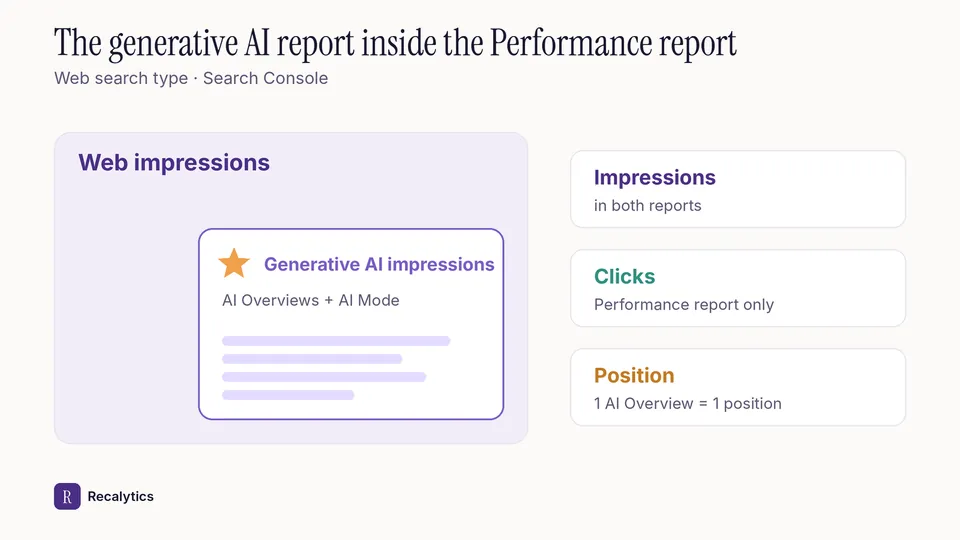
Impressions in the generative AI report are already part of the Web search type impressions in the Performance report. The generative AI report pulls part of those impressions out so they can be read on their own.
Clicks on links in AI Overviews and AI Mode count as ordinary clicks in the Performance report. An AI Overview takes 1 position, and every link inside it shares that position. The full rules are in how to read the Search Console Performance report.
How do you put generative AI data in a client report?
Give generative AI impressions a section of their own, then compare them with total Web impressions and with clicks. With that layout, the client does not read a rise in AI impressions as a rise in visits.
- Record generative AI impressions for this month and last month.
- Work out their share of total Web impressions in the Performance report.
- Sort pages by generative AI impressions and take the top 5.
- Open the Performance report, filter those 5 pages and record their clicks and CTR.
- Write one sentence for every change above 10%.
A rise in AI impressions without a rise in clicks is one cause of impressions up but clicks down. Link the two sections in the report so the explanation is complete.
Recalytics turns the Search Console and GA4 data of every client website into a monthly report. Its narrative numbers are checked against the data.
Frequently asked questions
Why don't I see the generative AI report in Search Console?
Usually because the site still has too few impressions in generative AI features. A site excluded from Google's generative AI features does not get the report either.
Since when is the generative AI report available to every site?
Since August 31, 2026, the generative AI report is available for every website worldwide.
Can the generative AI report data be exported?
Yes. Chart and table data can be exported, and values shown as ~ or - export as zeros.
Sources
- Search Console Help: Generative AI performance report (Search)
- Google Search Central Blog: Introducing Search generative AI performance reports (June 2026)
- Search Console Help: What are impressions, position, and clicks?
- Search Console Help: Performance report (Search results), dimensions and data groupings
The Recalytics Team writes guides on SEO and analytics reporting for digital agencies and website owners, based on Google's official documentation and Search Console and GA4 data.