How to Use Search Console Regex to Split Brand Queries
Short answer
A Search Console regex filter selects queries or pages by a text pattern. Open the Performance report, add a Query filter, choose Custom (regex) and enter a pattern such as brand|brand-name. Choose Doesn't match regex to see non-brand queries.
In this article
A Search Console regex filter is a Performance report filter that selects queries or pages by a text pattern rather than a single word. One pattern can cover the brand name, its misspellings and its product names at once.
Clients often ask to split brand and non-brand queries, to see whether a rise in clicks comes from people who already know the brand. This guide covers Search Console regex syntax, example patterns and Google's built-in branded filter.
How do you use a regex filter in Search Console?
To use a regex filter in Search Console, open the Performance report, add a Query or Page filter and choose Custom (regex). The full steps:
- Open the Performance report and choose Search results.
- Click Add filter, then choose Query or Page.
- Choose Custom (regex) in the filter type menu.
- Choose Matches regex and write the pattern.
- Click Apply.
Doesn't match regex shows every query that does not match the pattern. Non-brand queries are found with that option.
Splitting brand and non-brand queries also helps when you explain the impressions up but clicks down pattern to a client.
What are the regex syntax rules in Search Console?
Search Console uses RE2 syntax, matches part of the text and ignores letter case. The way a pattern is written follows those rules.
- A pattern matches anywhere in the query. Use ^ for the start of the query and $ for the end.
- Upper and lower case count as the same. Put (?-i) in front of the pattern to make it case-sensitive.
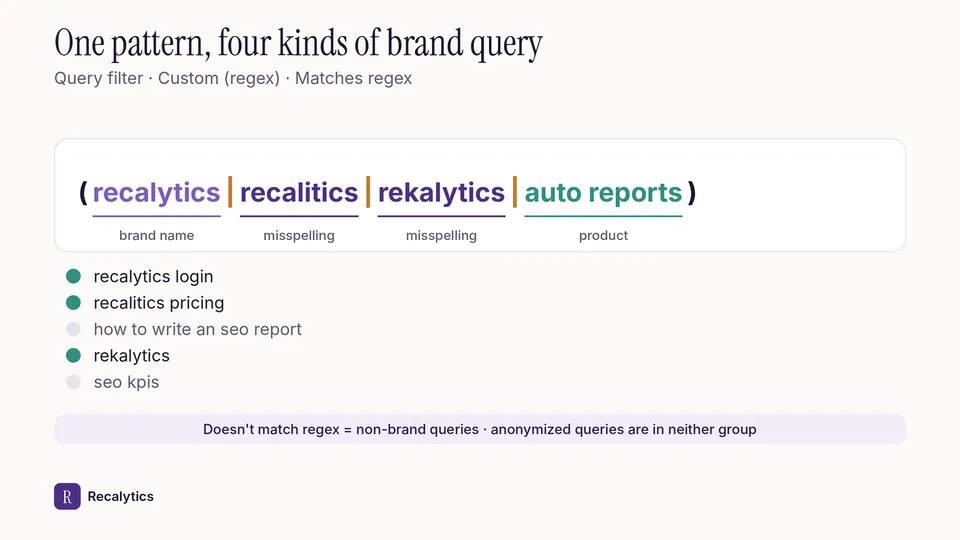
- Separate several values with a vertical bar inside parentheses, for example (brand|label|product).
- Square brackets offer a choice of letters. The pattern c[aie]t matches cat, cit and cet.
- A plus sign means the letter before it appears 1 or more times. The pattern fo+d matches fod and food, but not fd.
The table below has example patterns for client reports. Replace the sample words with the client's brand name.
| Goal | Regex pattern | Filter |
|---|---|---|
| Brand queries and misspellings | (recalytics|recalitics|rekalytics) | Query, matches |
| Non-brand queries | (recalytics|recalitics|rekalytics) | Query, doesn't match |
| Question queries | ^(what|how|why|when|which) | Query, matches |
| Long queries, 5 words or more | ^(\S+\s){4,}\S+$ | Query, matches |
| Blog pages only | /blog/ | Page, matches |
How is a regex filter different from Google's built-in branded filter?
Google's built-in branded filter splits brand and non-brand queries automatically. A regex filter uses a pattern you write yourself. Google introduced the built-in branded filter in Search Console in November 2025.
According to Google, branded queries include variations and misspellings of the brand name, as well as the brand's products or services. Google's examples are Gogle and Gmail for the Google brand. The filter is in the Performance report and on a card in the Insights report.
| Point | Built-in branded filter | Regex filter |
|---|---|---|
| How brand queries are decided | Automatically, by Google | By the pattern you write |
| Property type | Top-level properties only | Every property |
| Volume requirement | Not available for sites with few impressions | None |
| Misclassification | Some queries can land in the wrong group | Follows the pattern, including its mistakes |
A regex filter is still needed for URL-prefix properties, subdomain properties and new sites with few impressions. A regex filter also helps when a client has product names that Google does not yet recognise as part of the brand.
Why don't brand and non-brand queries add up to total clicks?
Brand and non-brand queries don't add up to total clicks because anonymized queries drop out once a query filter is applied. Anonymized queries are queries searched very rarely, which Google hides to protect privacy.
The unfiltered chart still counts anonymized queries. Adding the Matches and Doesn't match results usually gives less than the unfiltered total. A client report should show all three numbers: total, brand and non-brand.
How to read clicks, impressions, CTR and position for each query group is covered in how to read the Search Console Performance report.
Recalytics pulls the Search Console data of every client website each month and turns it into a report compared with last month and last year.
Frequently asked questions
Is the Search Console regex filter case-sensitive?
No, by default upper and lower case count as the same. Put (?-i) in front of the pattern to make it case-sensitive.
Why doesn't the branded filter appear in my property?
The built-in branded filter is only available for top-level properties with enough queries and impressions. URL-prefix and subdomain properties don't get it.
Can two regex filters be used at once?
Yes, one for Query and one for Page. The Compare feature allows only 1 comparison at a time.
Sources
- Search Console Help: Performance report (Search results), advanced filtering and comparison
- Search Console Help: Performance report (Search results), dimensions and data groupings
- Google Search Central Blog: Introducing the branded queries filter in Search Console (November 2025)
- Search Engine Land: Google Search Console adds branded queries filter (20 November 2025)
- Search Console Help: Performance report, troubleshooting data discrepancies
The Recalytics Team writes guides on SEO and analytics reporting for digital agencies and website owners, based on Google's official documentation and Search Console and GA4 data.