How to Give an Agency or Client Search Console Access
Short answer
To give Search Console access, open Settings, then Users and permissions, then Add user. Enter the Google account email, choose Full or Restricted and save. Only a property owner can add users.
In this article
To give an agency or client Search Console access, add their Google account email under Settings, then Users and permissions, with the right permission level. Only a property owner can open that page.
Search Console access is usually requested in the first week of a contract, before the agency can build a report. This guide on how to give Search Console access covers the permission levels, the steps, the limits and how to remove access when the work ends.
What permission levels does Search Console have?
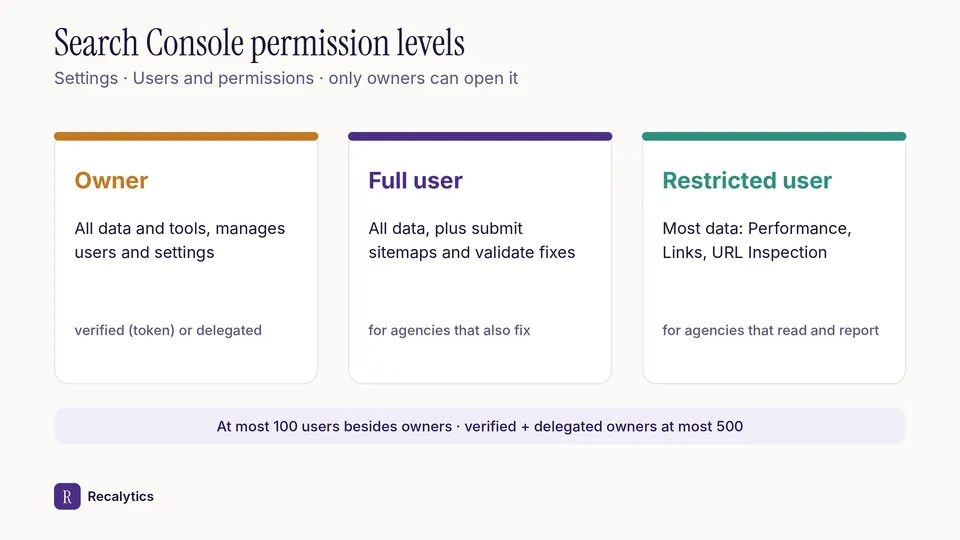
Search Console has 3 permission levels for people: owner, full user and restricted user. There are also associates, accounts that act on the site's behalf without being able to open Search Console.
| Permission | What it can do | Suits |
|---|---|---|
| Owner | All data and tools, adds and removes users, changes settings | The business owner or the client's web team |
| Full user | Sees all data and takes some actions, such as submitting a sitemap and validating fixes | An agency that also does technical fixes |
| Restricted user | Sees most data, such as the Performance, Links and URL Inspection reports | An agency that only reads and reports |
Owners come in 2 kinds with the same permissions. A verified owner proves ownership with a token, such as an HTML file or a tag. A delegated owner is granted ownership by a verified owner, without a token.
How do you add a user in Search Console?
A property owner adds users from Settings, then Users and permissions. The full steps:
- Open the property in Search Console.
- Choose Settings, then Users and permissions.
- Click Add user.
- Enter the user's Google account email. An email group cannot be added.
- Choose Full or Restricted, then save.
A property can have at most 100 users besides its owners. Delegated owners can be added until verified and delegated owners together reach 500.
A Domain property covers every subdomain of the site, so one grant is enough for the whole site. Property types and verification are covered in what Google Search Console is and how to use it.
How do you remove access when the work ends?
Remove access with Remove access on the Users and permissions page, then delete the user's verification token if they were a verified owner. Without the second step, a verified owner can verify again for as long as their token stays on the site.
The data an agency reads from Search Console feeds the monthly SEO report. Recalytics reads every client's Search Console and GA4 data with read-only access and turns it into a monthly report.
Frequently asked questions
Which permission is enough for an agency that only reports?
A restricted user can already open the Performance, Links and URL Inspection reports. Choose Full user if the agency also needs to submit sitemaps or validate fixes.
Can an email group get Search Console access?
No. Access is granted per Google account, not per email group.
Is data lost when an agency's access is removed?
No. The data stays in the property, and the owners can still open it.
Sources
The Recalytics Team writes guides on SEO and analytics reporting for digital agencies and website owners, based on Google's official documentation and Search Console and GA4 data.