How to Explain Seasonality in an SEO Report
Short answer
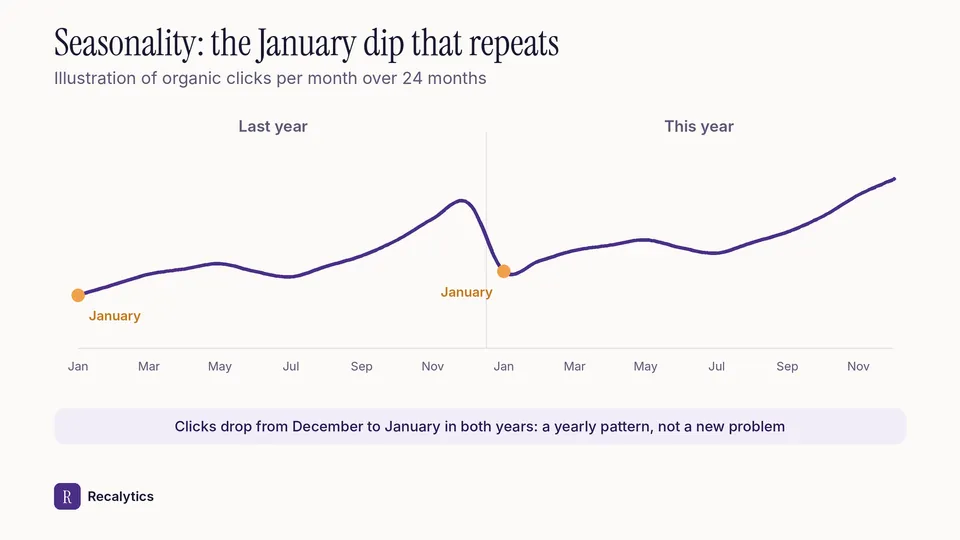
Seasonality is explained by comparing this month with the same month last year, then checking the search interest pattern in Google Trends. A drop from last month is not a problem when the same pattern shows every year.
In this article
Seasonality in an SEO report is a rise and fall in clicks that repeats in the same months every year, because search interest rises and falls. Google lists seasonality and changing interests among the main causes of a traffic drop.
A January report often shows clicks down from December, and the client asks what went wrong. This guide on how to explain seasonality in an SEO report covers how to confirm it from the data and how to write it up for the client.
How do you confirm a drop in clicks is seasonal?
Compare this month with the same month last year, then check whether the same pattern happened last year. Google suggests using 16 months of Search Console data to make sure a drop is not a yearly pattern caused by a holiday or a trend.
- Open the Performance report and pick a 16-month range.
- See whether this month's drop also happened in the same month last year.
- Click Compare, then choose the last 3 months year over year.
- Check the client's top queries in Google Trends to see their search interest pattern.
How do you read Google Trends for an SEO report?
Google Trends shows relative search interest on a 0–100 scale, not a number of searches. Trends data is normalized to time and location and calculated from a sample of Google searches.
A 0 in Google Trends can mean low search volume rather than no searches. Two regions with the same value do not necessarily have the same search volume.
Google gives examples of a query with strong seasonality and a stable one. Search interest in turkey peaks every November. Interest in coffee is much more stable through the year.
How do you write seasonality up for a client?
Write 2 comparisons in one sentence: against last month and against the same month last year. The client can then see a seasonal dip without assuming the site has a problem.
| Situation | Example sentence |
|---|---|
| Down from last month, up from last year | January clicks fell 12% from December, but rose 5% from January last year. |
| Down from last month and from last year | January clicks fell 12% from December and 8% from January last year, so the drop is larger than the yearly pattern. |
| Up because of the season | November clicks rose 30% from October, much like last November, which rose 28%. |
A drop larger than the yearly pattern needs the checks in how to explain a drop in organic traffic to clients. The YoY comparison is also a fixed part of the monthly SEO report.
Recalytics pulls every client's Search Console data each month, and its reports compare with last month and last year.
Frequently asked questions
How do you explain seasonality for a site less than a year old?
Use Google Trends for the top queries, because there is no Search Console data from last year yet. Mention that the YoY comparison becomes available next year.
Are Google Trends numbers the same as search volume?
No. Google Trends shows relative interest on a 0–100 scale, not a number of searches.
How long does Search Console keep data?
16 months. Keep your own monthly data if the client needs comparisons over more than 1 year.
Sources
The Recalytics Team writes guides on SEO and analytics reporting for digital agencies and website owners, based on Google's official documentation and Search Console and GA4 data.